Don't need apologies. Boy, you're an alien your touch so foreign, it's supernatural, extraterrestrial. Talk about our future like we had a clue. I can feel a phoenix inside of me.
Web Designing
Beginner’s Guide: How to Learn Web Designing at Home
Web design is quite complex and daunting, but with the development of Internet and technology, web design overflow than ever before nowadays. Hence, becoming a web designer has become the main trend among young designers. Today, I will guide you about how to learn web design at home briefly.
1. First, you should know about what is web design?
Visual+interaction=web design core
Many young designers often misunderstand the concept of web design, web design is about design, not about coding and front-end development. Of course, it would be great if you know some coding language (HTML, CSS, Java), but you can’t get yourself deep into front-end development, that’s not the core of web design. Web design is to solve the communication problems between users and web page information.
2. 9 web design skills young designer should master
Master the basic rules of visual design
To learn the layout design
To master the basic knowledge of interaction design
Have to master the PS and other web UI mockup tool
Understand the basic coding language(HTML, CSS)
Familiar with the company product and the user group
At least, master one of the front-end coding edit software, I would like to recommend the Dreamweaver
Know about the SEO
3. Five elements of web design
Layout, color, graphics, font, content
4. How to learn web design at home
One post can’t include all the information, so here I’m going to introduce some learning website to guide you step and step.
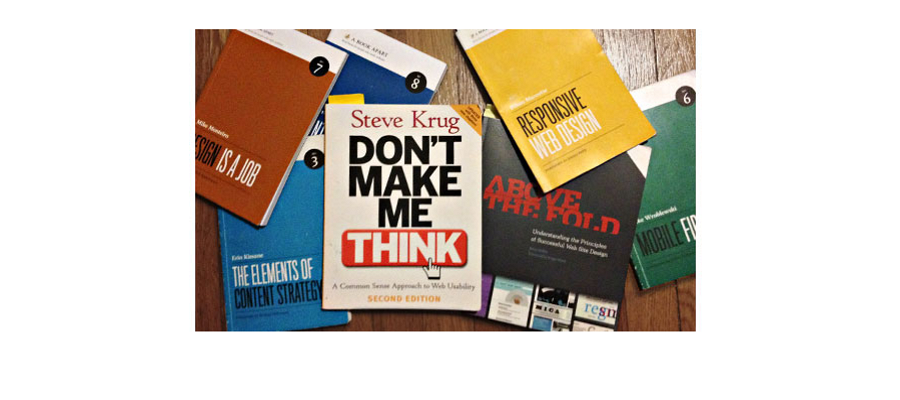
Web design learning books:
1. HTML and CSS: Design and Build Websites
2. Learning Web Design: A Beginner’s Guide
3. Don’t Make Me Think: A Common Sense Approach to Web Usability
4. Learning How to Make Web Pages Functional
5. Designing with Web Standards
Web design online learning courses:
Treehouse
Lynda
Udemy
Web design blogs:
1. Smashing Magazine
3. Webdesigner Depot
4. Webdesignledger
5. WEB DESIGN LIBRARY
6. Hacking UI
7. 1stwebdesigner
8. WEBAPPERS
Coding:
1. W3Schools
To learn the basic coding language, it includes:HTML and CSS with simple language to teach you.
2. Google Code University
Another coding learning website which is created by Google developer.
3.Code Avengers
I like this learning website, because of it’s just like big adventure that allow you to participate in their coding challenge programme and bug hunting.
HTML and CSS:
30 Days to Learn HTML and CSS
A Beginner’s Guide to HTML & CSS
Don’t Fear the Internet

Conclusion:
No matter what position you are in, learning is the only way to achieve your goal. If you want to know about how to learn the web design at home, above is all you have to know. Stop wasting your time on Facebook or Twitter to look for answers. You can build your design circle in there, but you can’t be a web designer by tooling around. Wish you good luck.
History
1988–2001
Although web design has a fairly recent history. It can be linked to other areas such as graphic
design, user experience, and multimedia arts, but is more aptly seen from a technological
standpoint. It has become a large part of people's everyday lives. It is hard to imagine the
Internet without animated graphics, different styles of typography, background, videos and
music.
The start of the web and web design
In 1989, whilst working at CERN Tim Berners-Lee proposed to create a global hypertext project, which later became known as the World Wide Web. During 1991 to 1993 the World Wide Web was born. Text-only pages could be viewed using a simple line-mode browser.[2] In 1993 Marc Andreessen and Eric Bina, created the Mosaic browser.
Evolution of web design
In 1996, Microsoft released its first competitive browser, which was complete with its own features and HTML tags. It was also the first browser to support style sheets, which at the time was seen as an obscure authoring technique and is today an important aspect of web design.[5] The HTML markup for tables was originally intended for displaying tabular data. However designers quickly realized the potential of using HTML tables for creating the complex, multi-column layouts that were otherwise not possible. At this time, as design and good aesthetics seemed to take precedence over good mark-up structure, and little attention was paid to semantics and web accessibility.
Tools and technologies
Web designers use a variety of different tools depending on what part of the production process they are involved in. These tools are updated over time by newer standards and software but the principles behind them remain the same. Web designers use both vector and raster graphics editors to create web-formatted imagery or design prototypes. Technologies used to create websites include W3C standards like HTML and CSS, which can be hand-coded or generated by WYSIWYG editing software. Other tools web designers might use include mark up validators[8] and other testing tools for usability and accessibility to ensure their websites meet web accessibility guidelines.
Marketing and communication design
Marketing and communication design on a website may identify what works for its target market. This can be an age group or particular strand of culture; thus the designer may understand the trends of its audience. Designers may also understand the type of website they are designing, meaning, for example, that (B2B) business-to-business website design considerations might differ greatly from a consumer targeted website such as a retail or entertainment website. Careful consideration might be made to ensure that the aesthetics or overall design of a site do not clash with the clarity and accuracy of the content or the ease of web navigation,[10] especially on a B2B website. Designers may also consider the reputation of the owner or business the site is representing to make sure they are portrayed favourably.
Page layout
Part of the user interface design is affected by the quality of the page layout. For example, a designer may consider whether the site's page layout should remain consistent on different pages when designing the layout. Page pixel width may also be considered vital for aligning objects in the layout design. The most popular fixed-width websites generally have the same set width to match the current most popular browser window, at the current most popular screen resolution, on the current most popular monitor size. Most pages are also center-aligned for concerns of aesthetics on larger screens.
Motion graphics
The page layout and user interface may also be affected by the use of motion graphics. The choice of whether or not to use motion graphics may depend on the target market for the website. Motion graphics may be expected or at least better received with an entertainment-oriented website. However, a website target audience with a more serious or formal interest (such as business, community, or government) might find animations unnecessary and distracting if only for entertainment or decoration purposes. This doesn't mean that more serious content couldn't be enhanced with animated or video presentations that is relevant to the content. In either case, motion graphic design may make the difference between more effective visuals or distracting visuals. Motion graphics that are not initiated by the site visitor can produce accessibility issues. The World Wide Web consortium accessibility standards require that site visitors be able to disable the animations.